
Odoo integration
Connecting Odoo to FBR digital invoicing
For businesses running Odoo Invoicing or Accounting (on Odoo Online, Odoo.sh or their own server) who need every customer invoice filed with FBR as it is confirmed, without rebuilding their accounting in a custom FBR module.
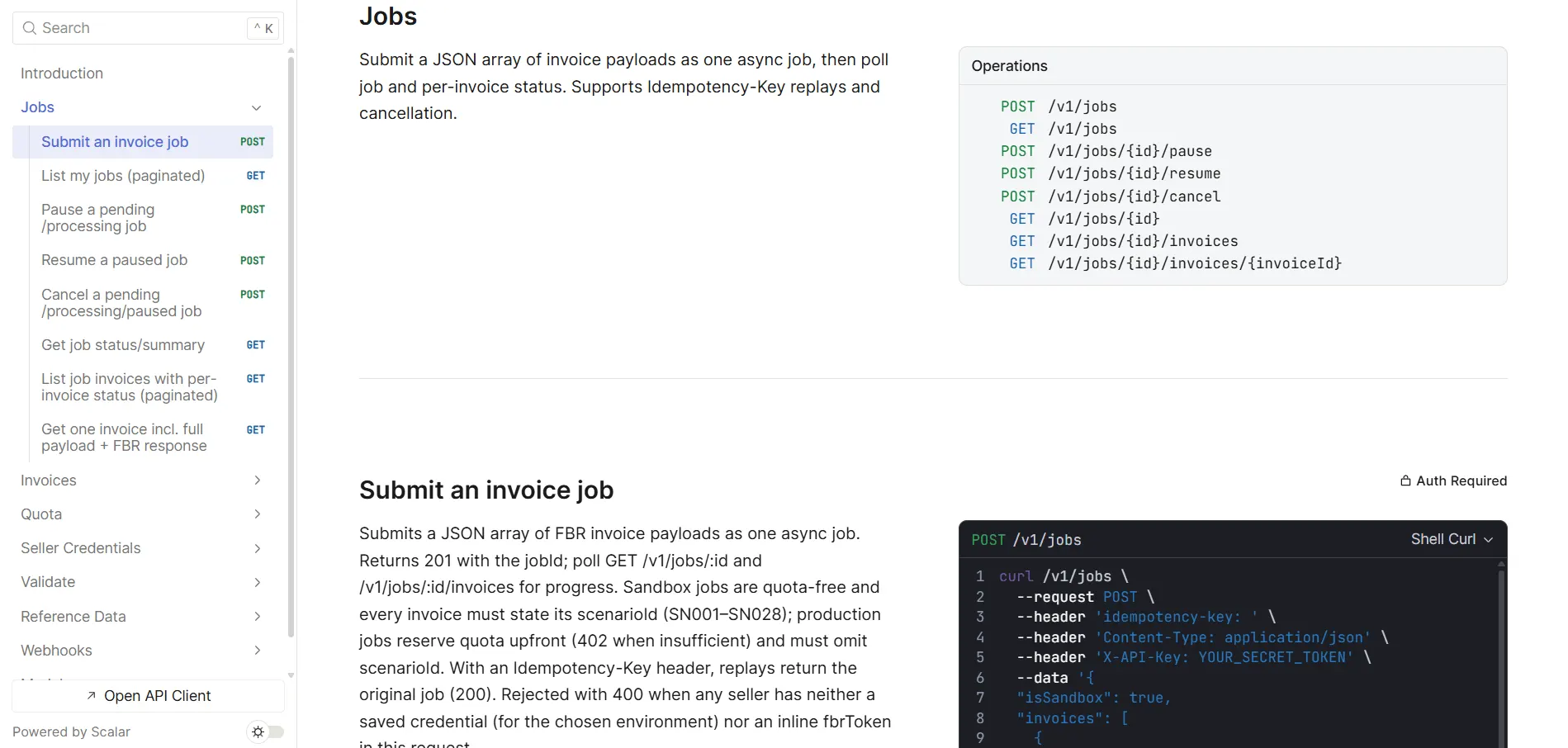
The mechanism
Where FBR fits in Odoo’s invoice flow
An Odoo invoice has a moment when it stops being a draft and becomes a posted accounting entry. That is the moment FBR cares about.
In Odoo, a customer invoice starts as a draft you can change freely. When someone confirms it, Odoo posts it: it gets its final number from the journal’s sequence, its lines and taxes are fixed, and it becomes part of the accounts. FBR wants each invoice transmitted as it is generated, and for an Odoo business, “generated” is that confirmation.
A well-built integration hangs off that moment and does five things for every posted customer invoice:
- Notice the invoice has been posted — through a hook inside Odoo, an automation that sends it out, or a service that asks Odoo for newly posted invoices every few minutes.
- Translate it into FBR’s shape — Odoo’s taxes into FBR sale types and rates, products into HS codes and FBR units, customers into registration types and provinces.
- Send it for filing — to eInvoicePro’s API, with Odoo’s own invoice ID as the idempotency key so a network retry can’t file it twice.
- Read the answer line by line — one rejected line means the invoice isn’t filed, however clean the rest of it looks.
- Write the result back — the FBR number, status and QR data onto the Odoo invoice, where the printed PDF and your team can see them.
Don’t make confirmation wait for FBR
It is tempting to call FBR in the middle of confirmation and refuse to post the invoice if FBR says no. In practice that ties your accountants to FBR’s response times and leaves Odoo half-way through a transaction when the connection drops. Post the invoice as normal, file it immediately afterwards, and show a clear status on the invoice (filed, failed, waiting) so a rejected invoice is fixed within minutes rather than blocking the person who raised it.
What changes once FBR has the invoice
After FBR returns a number, the version FBR holds is the one that counts. Odoo will still let an accountant reset a posted invoice to draft and change it, but FBR’s copy stays exactly as it was — there is no API call that edits or cancels a filed invoice. If something genuinely went wrong, the fix is made by hand on FBR’s side in the three days after the invoice was generated; after that, only with the Commissioner’s permission. A good connector marks filed invoices clearly so nobody “fixes” one in Odoo and assumes FBR followed.
Nothing here needs Odoo Enterprise, a specific Odoo version or a new chart of accounts. It needs your invoices, taxes, products and customers, and a decision about where the connector runs.
Your options
Your Odoo hosting decides the route
The same connection can live inside Odoo or beside it. Which one is open to you depends mainly on where your Odoo runs.
Odoo Online
Odoo’s standard cloud doesn’t accept custom modules, so the connector runs beside Odoo. From Odoo 17, an automation rule can send each invoice out to a web address when it is saved; reading invoices and writing the FBR number back goes through Odoo’s external API.
Watch: on Odoo Online, API access comes only with Odoo’s Custom plan — check yours before planning around it.
Odoo.sh
Odoo’s platform for customised databases. A custom module, pushed from your own repository, can hook directly into invoice posting and write the FBR number back onto the invoice, with a staging branch for testing.
Watch: test on a staging branch against FBR’s sandbox before anything touches production.
Your own server or a partner’s
Full control: a module inside Odoo or a service beside it both work. The one requirement is that the server can make outgoing HTTPS calls to eInvoicePro.
Watch: older or heavily customised installs need the posting hook tested against your version, not the documentation’s.
Edition and version details that matter
Community and Enterprise don’t change this picture: the external API and the invoice records are the same in both. Two version details do matter. On Odoo 19 or later, build against Odoo’s newer JSON-2 API — the older XML-RPC and JSON-RPC endpoints are scheduled for removal in Odoo 22. And from Odoo 15, Odoo ships a Pakistan localization with a Pakistani chart of accounts and sales tax set-up: a sensible starting list of taxes for your mapping, but no FBR e-invoicing connection.
How many companies you run in one database, and whether invoices go through one journal or several, matter more than edition — both come up in the traps below.
The data
FBR’s fields, and where they live in Odoo
Most of an FBR invoice already exists in Odoo. The gaps are the same ones every accounting system has: sale type, HS code, FBR’s unit wording and the buyer’s registration type.
| What FBR asks for | Where it usually comes from in Odoo | What to watch |
|---|---|---|
| Your NTN or CNIC and province | The company record — its tax ID and address | Bare digits; province must be one of FBR’s, not a city |
| Buyer NTN or CNIC | The customer’s tax ID field | Often blank for walk-in or retail customers — decide how unregistered buyers are handled |
| Buyer registration type | Not a standard Odoo field | Add a customer field and fill it by checking each number with FBR |
| Buyer province | The customer’s address state | Map Odoo’s states to FBR’s province names once |
| Invoice number | The journal sequence, such as INV/2026/00042 | FBR accepts letters, digits and hyphens only — slashes must be transformed |
| Document type | Customer invoice or credit note | Notes follow FBR’s own rules and must reference the original FBR invoice number |
| HS code | Products gain an HS Code field when Odoo’s shipping apps are installed; otherwise there is none | Fill it per product (or map by product category) from FBR’s own list, stored as text |
| Unit of measure | The product’s unit, such as Units or kg | Translate to FBR’s wording; valid units can depend on the HS code |
| Sale type, rate and SRO | The taxes on each invoice line | Map each Odoo tax to an FBR sale type; take the rate from FBR’s lookup |
| Value excluding tax and sales tax | Line subtotal and tax amounts Odoo has already computed | Price-included taxes must be backed out so FBR gets the value before tax |
| Discount | The line discount | Make sure it isn’t applied twice when the value is already net |
Odoo’s taxes are the hinge of the whole mapping. Our article on mapping tax codes to FBR sale types explains how to turn each one into what FBR checks.
Architecture choice
A full FBR module inside Odoo, or a thin connector to a ready layer
Odoo’s openness makes a do-everything FBR module tempting. The question is who keeps it working when FBR changes something.
Custom module talking to FBR directly
- Your developer owns FBR’s payload, token handling, retries and line-level error reading inside Odoo
- Every FBR technical change means updating, re-testing and redeploying the module
- FBR has no duplicate protection, so safe retries have to be designed from scratch
- NTN/CNIC checks and FBR’s reference lookups for HS codes, units and rates are yours to build
- A second Odoo database, or a non-Odoo sales channel, means doing it again
Odoo → eInvoicePro → FBR
- The connector only translates Odoo’s data and sends one API call per invoice or batch
- When FBR revises its specification, the update lands in eInvoicePro — your Odoo code stays as it is
- Idempotency keys, per-invoice retries and FBR’s raw responses come built in
- HS code, unit, rate and SRO lookups are available to check your mapping against FBR’s own data
- Each Odoo company files under its own NTN, yet all of them live in a single eInvoicePro account
Using Odoo? Book a demo
See how eInvoicePro files invoices with FBR, and ask us anything about connecting it to Odoo.
Watch these
Odoo-specific traps
Each of these passes a quick demo and fails in the first month of real invoices.
Numbers and documents
- Journal sequences with slashes, such as
INV/2026/00042, are rejected by FBR as they stand - Several sales journals mean several sequences — the FBR number you send must still be unique
- A credit note needs the original invoice’s FBR number, not just its Odoo reference
- Resetting a filed invoice to draft in Odoo changes nothing at FBR
Taxes
- Price-included taxes hide the value before tax that FBR needs on each line
- Fiscal positions swap taxes per customer, so the same product can reach FBR under a different sale type
- Two Odoo taxes on one line may belong in separate FBR fields, such as sales tax and further tax
- A single “GST 18%” tax used for everything cannot express reduced-rate or exempt lines
Companies and scope
- Each company in a multi-company database has its own NTN and its own FBR credentials
- Invoices between your own companies need a clear rule — FBR won’t accept one whose buyer and seller share an NTN
- Walk-in or retail customers without a tax ID need an agreed unregistered-buyer treatment
- Services may fall under a provincial authority rather than FBR
Selling services? Check this first
Service income is usually a provincial matter. FBR’s scheme takes in goods, federal excise duty charged in sales tax mode, and services supplied in Islamabad Capital Territory, not services in general. If you sell services in Punjab or Sindh, see our guides to PRA E-IMS and SRB POS before building anything.
Going live
A realistic four-week rollout
Connecting the API is quick. Mapping taxes and products, and proving the mapping in FBR’s sandbox, is where the weeks go.
-
Map taxes, products and customers
List every tax used on customer invoices and give each an FBR sale type. Add HS codes and FBR units to products — by product category where you can. Fill in tax IDs, registration types and provinces for the customers you invoice most.
-
Build the connector against FBR’s sandbox
Point the connector at eInvoicePro with the sandbox flag on (same address and key, different flag) and run real Odoo invoices through the scenarios FBR has assigned to your business. On Odoo.sh or your own server, do this on a staging copy of the database.
-
Run in parallel
For a week, every confirmed invoice goes through FBR’s validation without being filed while your team carries on as usual. Check the daily totals against Odoo’s sales reports; new products and new customers are where the gaps usually show.
-
File on every confirmation
Switch to live filing. Put the FBR number and QR code on the printed invoice, and give someone ownership of the list of failed invoices for the first weeks.

Finance
Owns the tax-to-sale-type mapping with your tax advisor, signs off test invoices, and fixes customer data when a buyer is rejected.

Odoo developer or partner
Builds the connector for your hosting, adds the fields for HS code, registration type and FBR number, and updates the invoice PDF to print them.
Tax advisor
Confirms scope, the sale types for reduced or exempt lines, and whether your integration spend qualifies for the section 64D credit.
FAQ
Frequently Asked Questions
Can Odoo send invoices to FBR on its own?
No. Odoo has no FBR connection built in. A connector passes each confirmed invoice to a filing layer such as eInvoicePro, which checks it against FBR’s rules, files it, and hands back the FBR invoice number.
Does it work with Odoo Community as well as Enterprise?
Yes. Both editions have the same external API and invoice records, which is all the integration needs. Hosting and plan matter more than edition: on Odoo Online the connector runs beside Odoo, while Odoo.sh and self-hosted Odoo can also take a custom module.
We use Odoo Online. Can we still integrate?
Yes, with one condition. Odoo Online doesn’t accept custom modules, so the connector runs outside Odoo and reads and updates invoices through Odoo’s external API, which on Odoo Online is available only on Odoo’s Custom plan. From Odoo 17, an automation rule can also notify the connector the moment an invoice is saved.
Doesn’t Odoo’s Pakistan localization already handle FBR?
No. Odoo’s Pakistan localization, available from version 15, provides a Pakistani chart of accounts, sales tax set-up and tax reports. It does not connect to FBR or produce FBR digital invoices, but its taxes are a good starting point for the mapping to FBR sale types.
How do we print the FBR number and QR code on the Odoo invoice?
Store the FBR number on the invoice, then adjust the invoice report template to print it with the QR code. On Odoo.sh or your own server that is a small module; on Odoo Online, what you can change in report templates depends on your plan.
We run several companies in one Odoo database. Is that several integrations?
One integration with per-company settings. Each company has its own NTN and FBR credentials, and one eInvoicePro account can hold credentials for several sellers — a single batch can even mix invoices from different companies.
Should we buy an FBR module instead?
If you evaluate one, from any source, ask who updates it when FBR changes its specification, how it avoids filing an invoice twice when a response is lost, whether it reads rejections line by line, and where it keeps the payload it sent. Those four answers separate a demo from something you can run for six years.
Can we correct or cancel an FBR invoice from Odoo?
Only on FBR’s side. No API call cancels or edits a filed invoice; a genuine mistake is corrected directly in FBR’s system within 72 hours, and later than that it needs the Commissioner’s approval. Resetting the invoice to draft in Odoo leaves FBR’s copy untouched.
Does the integration cost qualify for the section 64D tax credit?
Possibly. For businesses that are required to integrate, section 64D allows a credit of 10% of what is invested in the electronic resources used to connect to FBR. Recurring subscription fees don’t count. Your tax advisor can tell you which parts of an Odoo connector build do.
Continue
Related guides & articles
Mapping tax codes to FBR sale types
Turning Odoo taxes and fiscal positions into what FBR checks on every line.
Read moreWhat to store once FBR answers
The FBR number, per-line results and payload, and why each matters.
Read moreDigital invoicing API
Jobs of up to 1,000 invoices, idempotency keys, webhooks and sandbox.
Read moreERP + FBR guide
The same pattern across SAP, Tally, QuickBooks, NetSuite, Business Central and Zoho.
Read moreFBR error codes
What each rejection means and which field to fix.
Read moreSection 64D tax credit
What integration spend qualifies for the 10% credit, and what doesn’t.
Read moreReady to simplify your FBR digital invoicing?
Join 2000+ businesses using eInvoicePro for real-time FBR integration and automated tax compliance.